


The ICEGATE portal plays a core role in reducing customs procedures in India’s trade and logistics. The electronic services offered by the portal cater to customs officials, trade bodies, and other agencies involved in imports and exports. Traders are required to check their status on the ICEGATE portal, as this is the first step toward being involved with customs electronically.
In this blog, we will walk you through the entire registration status check process on the ICEGATE portal so that you can access the platform seamlessly.
Understanding ICEGATE Portal
ICEGATE is an e-platform developed by the Indian Customs Department, which stands for Indian Customs Electronic Gateway, for the smooth exchange of trade information and data between the trading community and customs authorities. The portal is part of wider e-government initiatives to digitize trade processes to enhance efficiency and transparency in import and export activities. The key functions of ICEGATE:
- Filing of import and export declarations.
- Tracking of consignments.
- Duty payments checking.
- The electronic clearance of goods.
- Compliance management related to Indian Customs Regulations.
In other words, ICEGATE is an integrated portal for trade facilitation, and registration is required at the front end to avail of some of these services.
Boost your business with Service Export from India Scheme and leverage ICEGATE for seamless trade processes to open new opportunities in the global market.
Why is ICEGATE Registration Important?
ICEGATE registration is imperative due to the following reasons:
E-Filing Services Access
Without registration, one cannot file any shipping bill, bill of entry, or other important documents electronically.
Shipment Tracking and Customs Clearances
It enables real-time shipment tracking and customs clearances for registered users at the ICEGATE portal.
E-Payment of Customs Duties
Registered users can use this to pay duties and other charges digitally, which makes transactions quite smooth.
Notifications and Alerts
Upon registration, the business receives alerts about any policy change or update on their consignment.
Talk To Expert

How to Check the Registration Status on the ICEGATE Portal?
(4.8)


Required for Registration of Authorized Dealer (AD) Code
The exporters must register at ICEGATE to obtain an AD code for filing the declarations electronically. With the above-mentioned advantages, it becomes clear that ICEGATE registration is important for all imported or exported business operations in India.
Know about the Types of ICEGATE Registration
Depending on the profile and functional role of the user in the trade ecosystem, the portal provides for the following types of ICEGATE registration:
Importer/Exporter Registration
This type is for those directly importing or exporting goods. These entities register using their Importer Exporter Code (IEC).
Kickstart your global trade journey with IEC registration now and make importing or exporting goods a breeze.
Customs Brokerage Registration
The agents under this category facilitate customs on an importer’s or exporter’s behalf.
Shipping Lines/Agents Registration
These carriers register with the system to process shipping documents.
Transporters Registration
Transporters also register themselves with the web-based electronic system at ICEGATE to facilitate the transportation of goods in an easy, secure, and hassle-free way, following customs traditions and obligations.
Read more Blogs – Trade license: Thing you needs to know
Conditions for the ICEGATE Registration Status Check
Conditions for the ICEGATE Registration status check are as follows:
Access to the ICEGATE Portal
You should be able to access the official website known as ICEGATE.
Registered Email ID and Mobile Number
You should be able to use the same email and mobile number you used at the time of registration. Status updates and confirmations are generally sent to these contact points.
Valid IEC
Most registration statuses are linked to your IEC, which is a must for any import/export business in India.
Steps to Check the Registration Status on the ICEGATE Portal
The status of your registration is available on the ICEGATE portal. Follow the step-by-step guide to check your registration status at the Portal:
STEP 1. Log in to the ICEGATE Portal
You are required to open your web browser and go to the official website of the ICEGATE portal.

STEP 2. Locate the Registration Services Section
Once you visit the portal, on the homepage, you should scroll or navigate down to the section “Registration Services.” This section will have options related to registration status, new registrations, and other services related to users’ accounts.
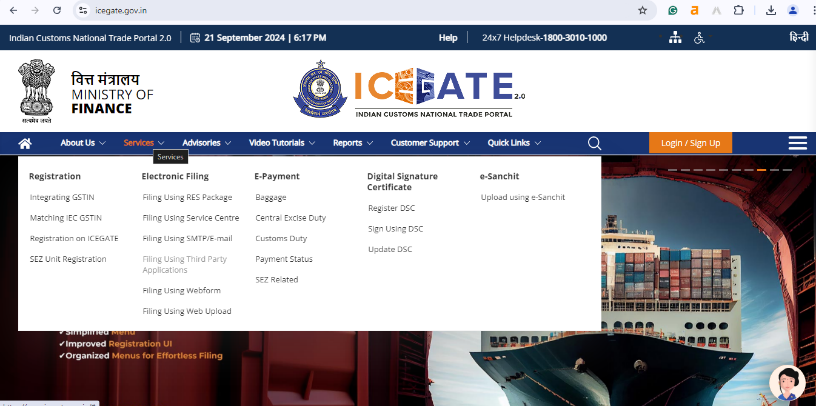
STEP 3. Click ‘Check Your Registration Status’
In the “Registration Services” section, click “Check Your Registration Status.” This will take you to another page where you will be asked to enter information to check your registration status.
STEP 4. Provide your IEC code and GSTIN
After entering the information required to check your registration status, you will be required to provide your IEC and, if applicable, your GSTIN number. You must make sure that you add these correctly to avoid any mistakes.
- IEC Code is a 10-digit number issued by the Directorate General of Foreign Trade.
- GSTIN: This is a 15-digit number that shall link your business and your tax records together.
Simplify your trading process with GST registration services and ensure your GSTIN is accurate and watch your business thrive in the competitive market.
STEP 5. Verify CAPTCHA
You will be asked to enter a security CAPTCHA code for verification purposes. This ensures that the system knows you are an actual legitimate user and blocks bots from spamming.
STEP 6. Click on ‘Submit’
After correctly filling in all the details, click on the ‘Submit’ button to proceed. The details provided will be verified against the database.
STEP 7. View Registration Status
Once the details are submitted, the registration status will appear on the screen. The status would usually show one of the following:
Registered: Your IEC is successfully registered on the ICEGATE portal.
Pending: Your registration is yet to be processed on the ICEGATE portal.
Rejected: There was probably some issue with your registration, and thus, it was not approved. You will have to seek further clarification from the support team.
STEP 8. Print or Save Status
Printing or saving the page that shall appear with a status after the registration process is highly recommended for further reference. This will be proof of your application submitted on the ICEGATE portal.
To Wrap Up
Checking the registration status on the ICEGATE portal is crucial to every enterprise involved in several import and export activities. This will ensure your firm can transact smooth business with Indian Customs electronically. By following the steps mentioned above, one can go through the process and resolve issues easily.
Keep the IEC Code and GSTIN handy when checking your status, and stay alert to any delays and rejections. This would put the business in a better position while handling customs procedures efficiently, thus making trade operations smooth and effective. The ICEGATE helpdesk always provides assistance regarding any other information so that all registered users can make maximum use of the portal for whatever custom needs.
Don’t let paperwork or registration process slow you down. Visit our Corpbiz website and verify your ICEGATE registration now to supercharge your trade journey with ease.
Frequently Asked Questions
Why ICEGATE registration is required?
Indian Customs offers an online gateway called ICEGATE, which makes it easier to file customs paperwork electronically, pay duties, and track shipments. You must register to use these services.
How much time does it take to register on ICEGATE?
The registration process may take a few hours to several days, depending on the verification procedure and the completeness of your application.
Is the IEC Code required to check my registration status?
Yes, you must have the IEC Code to verify the registration status. In the customs system, it serves as your unique identity.
What needs to be done if the registration is denied?
If your registration is denied, carefully examine the portal's rationale for rejection. Then, you can fix any mistakes and submit the application again. For assistance, contact the ICEGATE helpdesk as well.
Is registration free on the ICEGATE portal?
No, registration on the ICEGATE portal is free. However, additional services related to customs processing could cost extra.
Who is eligible for registration on the ICEGATE portal?
The ICEGATE portal allows various companies to register, such as importers, exporters, shipping agencies, customs brokers, and transporters. Depending on how each group fits into the commerce ecosystem, there are several registration types.
What information is necessary to verify my registration status?
To check your registration status, you'll need access to the ICEGATE portal, your registered email address, mobile number, Importer Exporter Code (IEC), and, if applicable, Goods and Services Tax Identification Number (GSTIN).
What are the possible registration status results?
The ICEGATE registration status can show the following results:
Registered: Your IEC was successfully registered.
Pending: Your registration is currently being processed.
Rejected: There was a problem with your registration that required more clarification.Why is ICEGATE registration required?
GSTIN (Goods and Services Tax Identification Number) is a 15-digit number that links your firm and tax records. It is necessary for import and export enterprises to streamline taxation and customs processing.
Can I get information regarding my consignment or policy changes?
Yes, the registered users receive information and alerts regarding any revisions to their consignment or changes in customs policies, ensuring that they remain informed.
Who can login e-SANCHIT Application?
Only users registered on ICEGATE can access e-SANCHIT applications through the e-SANCHIT link.
What GST-related validation is performed at ICEGATE?
ICEGATE conducts several validations, including:
The invoice number in GSTR-1 matches the shipping bills.
The port code in GSTR-1 aligns with the shipping bill.
The GSTIN used for filing GSTR-1/3B corresponds to the one on the shipping bull.
The carrier has filed the EGM.
All invoices listed on the shipping bill have been received from the GST system and successfully validated at ICEGATE.
Read more Blogs – How to Get Trade License Easily in India?